Table of Contents
(Image Source: Meta AI, AI-generated illustration)
A LinkedIn profile for students is more than an online resume. It gives recruiters, founders and potential professional connections a clearer picture of who you are, what you can do, and what opportunities you’re looking for.
When I started messaging founders about internships using my LinkedIn Profile for Students, I ran into something uncomfortable. The first thing anyone does after a message from a stranger is tap through to that person’s LinkedIn Profile for Students.
Start With a Proper Photo
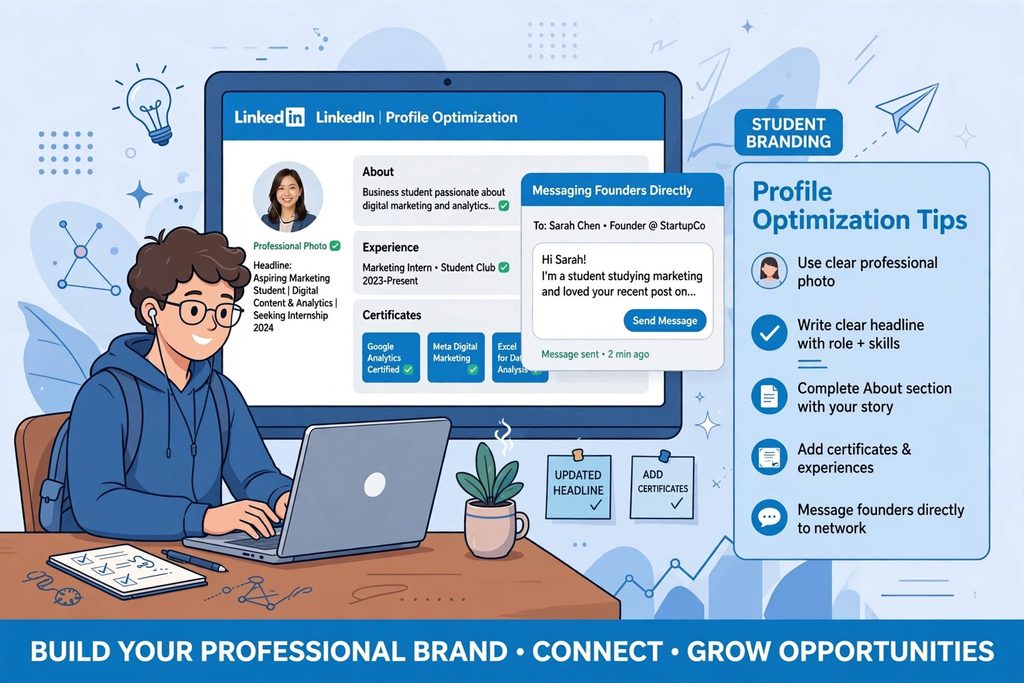
My first problem was the picture. I didn’t have a formal one, and a casual photo makes a profile look unfinished. So I got a proper one taken. You don’t need a studio shoot. Just make sure the picture is sharp, your face is easy to spot, and the backdrop isn’t distracting. Everyone’s eyes land there first, and it sets the tone for the rest of the page.
The Page Behind Your Resume
On a placement portal, a recruiter sees your resume and not much else. Your LinkedIn page is where they can check the rest: what you do outside classes, who you’re connected to, and whether what you’ve written lines up. Some colleges now tell students to treat the profile as seriously as a transcript. Waiting until placement week to build yours is a bad idea, because rushed work shows. Building a LinkedIn profile for students doesn’t require years of work experience. Relevant projects, volunteering, coursework, and a clear professional direction can help you create a profile that feels credible.
Building the Experience Section
After the photo, the next gap was content. I wanted more experience, skills and certifications on there, so I took up courses and collected certificates wherever I could. The goal was simple: stand out.
Here’s the catch, though. Not every certificate pulls its weight. Keep the ones tied to the field you want to enter. A dozen unrelated ones just look like a collection. From what I’ve read, people reviewing student profiles care more about initiative and relevant skills than a long job history. Next to each course or role, add a line on what you actually did and learned.
Don’t assume experience means a full-time job. Internships, freelance gigs, class projects and society roles all go in. As for skills, the platform caps you at 50. I’d choose the ones you can talk about confidently and pin your best three at the top.
Say Something Specific in Your Headline and About
The default headline, “Student at” plus your college, says nothing. The headline field holds 220 characters, enough to say who you are and where you’re headed.
Your About section has room for 2,600 characters, yet readers only see the opening lines until they tap to expand. Make those lines count. Talk about yourself directly: your course, your work so far, the role you’re chasing. Phrases like “hardworking and dedicated” are everywhere, so leave them out.
Messaging Founders Directly
I’ve been messaging founders to ask about internships. It takes patience, and replies aren’t up to you. Your side of it is the message itself and the profile it points to. Keep the note short, mention why you picked that particular person, and check that your profile supports what you’ve said.
The founder who visited our class said communication is one of the first things he notices when hiring interns. A direct message is where that starts, so write it like you’d actually speak.
Mistakes Worth Avoiding
Stuffing in every certificate you’ve ever earned makes the page noisy. Listing skills you can’t explain is risky, since an interviewer can poke at them in seconds. Your profile and resume should also tell the same story, because whoever’s reading may well check one against the other. And after you land something, keep the profile alive.
Conclusion
A good student profile doesn’t have to look impressive. It just has to be clear and believable. Use a proper photo. Write a headline and about section that sound like you. Put real work behind them. Then message people with a reason, not a template. Keep it updated after that, because a profile you ignore quietly goes stale. A strong LinkedIn profile for students doesn’t need to look impressive on paper; it needs to reflect real skills, relevant experience, and clear intentions.
References
[1] “LinkedIn Profile Tips for Freshers in India 2026: Get Recruiter Attention,” Jobrise. [Online]. Available: https://jobrise.io/en/blog/linkedin-profile-tips-for-freshers-india-2026/
[2] “How to Improve Your LinkedIn Profile,” FACE Prep. [Online]. Available: https://faceprep.in/article/how-to-improve-your-linkedin-profile/
[3] “How to Build a Strong LinkedIn Profile as a College Student,” Krupanidhi. [Online]. Available: https://krupanidhi.edu.in/blog/?p=448
FAQs
1. How to Build a LinkedIn Profile for Students?
Students should use a clear profile photo, write a specific headline, complete their About section, and highlight relevant coursework, projects, internships, certifications and extracurricular activities. The goal is to show what they can contribute, even if they have limited professional experience.
2. What should a student write in their LinkedIn headline?
A student headline should communicate their field of study, areas of interest and professional direction. For example: “Business Student | Aspiring Marketing Professional | Interested in Content Strategy and Brand Communication.” Keep it accurate and specific to your goals.
3. LinkedIn Profile Tips for Students Seeking Internships.
Highlight academic projects, volunteering, student society responsibilities, independent projects and relevant coursework. Explain what you contributed and what you learned instead of leaving readers with a list of titles or certificates.
4. What should students include in the LinkedIn Experience section?
Students can include internships, freelance assignments, volunteering, campus roles and substantial academic or personal projects. Describe your responsibilities, the skills you applied and any genuine outcomes you can demonstrate.
5. How do I write a LinkedIn About section as a student?
Start with your current studies and professional interests. Follow with relevant experience, projects or skills, then explain the opportunities you hope to explore. Write in a natural first-person voice and avoid unsupported claims or generic descriptions.
6. How should students message founders on LinkedIn for internships?
Keep the message brief and personalised. Introduce yourself, mention something specific about the founder or organisation, explain why you’re reaching out, and state what kind of internship opportunity interests you. Avoid sending the same generic message to everyone.
7. Do LinkedIn certifications help students get internships?
Certifications can demonstrate initiative and familiarity with a subject, but they do not guarantee an internship. Prioritise courses relevant to your target role and support them with projects or examples showing how you’ve applied what you learned.
8. How often should students update their LinkedIn profiles?
Update your profile whenever you complete a relevant project, gain a certification, take on a new responsibility or change your caree