
Table of Contents
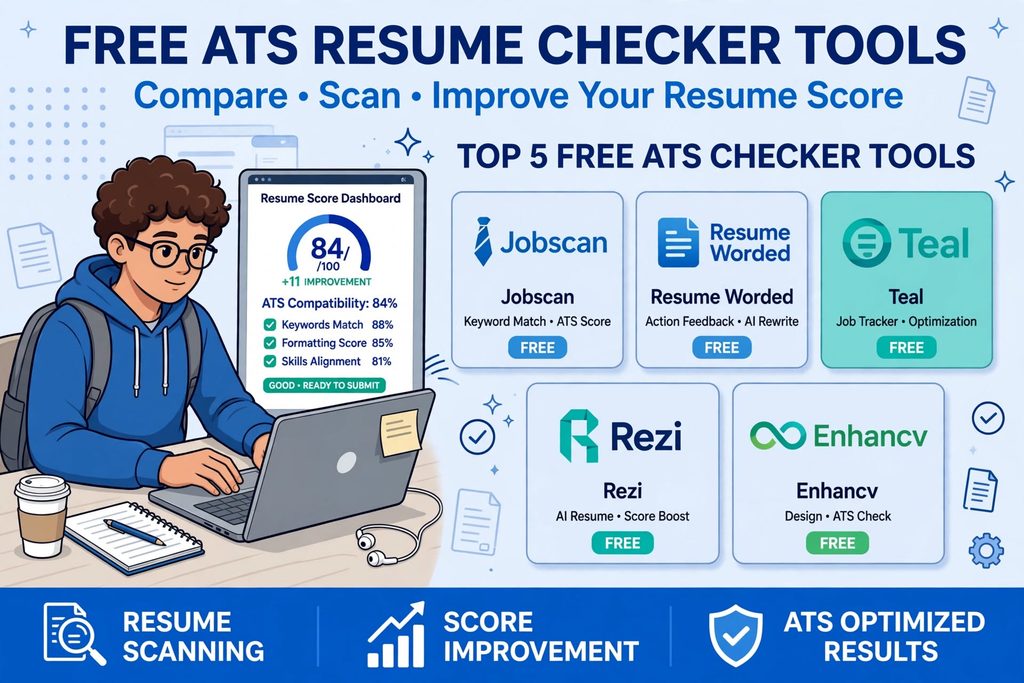
Image source (Meta AI)
Getting your resume ready can take a lot of time, especially when you are applying for an internship or your first job. Even if you have grades, relevant skills, and projects to show, it can still be hard to know whether your resume meets what a company expects.
This is where a resume checker can help. There are tools that look at your resume and give you tips to improve it. Some tools focus on the appearance of your resume—like spacing, formatting, or section headings. Others compare your resume to a job description. Point out missing skills or keywords.
These tools are especially useful for students and recent graduates. If you are applying for jobs through campus programs or company career websites, using one of these tools can help you make improvements. Many of these tools offer scans or basic feedback, which is great if you are just starting.
This article talks about five free resume scanners you can try. It also gives step-by-step instructions on how to run a scan and how to improve your resume score without spending money.
What is an ATS resume score?
An Applicant Tracking System, or ATS, is software that companies use to manage job applications. This software can read resumes, extract information, and help recruiters sort candidates faster.
An ATS resume checker is a tool that analyzes your resume based on criteria. These could include section titles, how readable your resume is, and how well your resume matches a
specific job description. The score from an ATS resume checker can help you see what parts of your resume need work. For example, if the job description mentions “market research” and your resume doesn’t include that phrase, the tool might flag it.
Keep in mind that a high score does not guarantee you an interview. A low score does not mean you are automatically rejected. Every tool works differently. Companies use ATS systems. So an ATS resume score should not be seen as the word on your chances of getting hired.
Five Free Tools to Check Your Resume
Here are five resume scanners you can try for free. While all of them offer features, it’s important to know that free plans may change over time. Always check the websites for the most current information.
1. Jobscan
Website: https://www.jobscan.co/
Jobscan lets you compare your resume to a job description. This is helpful for finding out which keywords and skills you should add. For example, if you are applying for a marketing internship that asks for “market research” and “content writing, ” Jobscan will show you where to include those phrases.
Its report highlights missing keywords and other issues. The free plan has some limits, so make sure to check what features are available.
Best for: Comparing your resume with a job description
2. Resume Worded
Website: https://resumeworded.com/
Resume Worded gives advice on how to make your resume better. It checks your keywords, structure, and overall quality. You can upload your resume and a job description to get a report with suggestions.
If you are a fresher, it might be hard to know how to describe your experience. Instead of saying “worked on a project, ” give more details—what the project was, what tools were used, and what the result was. The tool can also help you organize your sections better.
Some suggestions are free. Deeper feedback usually requires a paid plan.
Best for: Advice on keywords and overall organization
3. Teal
Website: https://www.tealhq.com/
Teal helps you build and organize your job applications. You can compare your resume to a job description, find keywords and skills to add, and track your applications. It’s smart to apply to internships and use Teal to see what keywords and skills are needed.
You will need to go through each job description to find words and skills. Teal can also help you keep track of where you’ve applied, which is great if you’re applying to many jobs. Some advanced features are only available with a paid plan.
Best for: Tracking applications while customizing resumes
4. Rezi
Website: https://www.rezi.ai/
Rezi helps you build and improve your resume. It gives suggestions on formatting and how to use keywords. Depending on your subscription, it can give you reports and advice.
As a fresher, this tool can help you learn how to structure your resume. Make sure your resume includes sections for projects, skills, and experience—and uses the keywords.
A resume builder is not a replacement for your effort. Always double-check everything before submitting to make sure your resume is accurate and truthful.
Best for: Customizing your resume and improving keyword use
5. Enhance Resume Checker
Website: https://enhancv.com/resources/resume-checker/
Enhancv checks your resume for issues with layout, content, and presentation. This tool is good for finding problems you might have missed during editing.
A resume checker is a guide, not a rulebook. Not every suggestion should be followed. Your resume must show your experiences and skills. Make sure your resume reflects your background while including the keywords.
Like tools, the free version does not include all features.
Best for: Finding layout issues in your resume
How to Use a Resume Checker Step by Step
You don’t need to use every resume checker tool to get a result. Instead, follow these steps to find out what changes to make.
Step 1: Prepare your resume
Make sure you have your latest resume ready. Save it in a folder you can easily find, like “Documents.” Make sure your resume is in the file format—PDF or DOCX—as requested by the website or job portal.
Step 2: Find a job description
Look for a job you’re interested in and feel confident applying for. Read the job description carefully. Make a note of the skills and keywords needed. If the tool allows, you can upload the job description along with your resume to compare the two.
Step 3: Run the check
Depending on the site, you can upload your resume file. Enter your information. Review the report. Suggestions the tool gives. Some resume checkers focus on keywords while others look at the layout and readability of your resume.
Step 4: Review the feedback
Look over what the tool says. It might suggest adding keywords or advise on the length of your project descriptions. It could also recommend removing sections.
While you should add keywords, don’t include terms or acronyms you don’t understand. Always make sure the information in your resume is true and accurate.
Also double-check for errors that the tool may have missed, like dates or incorrect contact information.
Step 5: Make changes. Proofread
After making the suggested changes, proofread your resume carefully. Make sure everything flows well and looks clean. If you want, you can use another resume checker to review your updated version and catch any mistakes.
How can freshers improve their score?
Many freshers worry that their resume won’t be taken seriously because they don’t have work experience. That’s understandable. Your resume can still stand out by showing relevant skills.
Here are some tips to help you improve your resume score as a fresher.
Match your resume with the job.
Always read the job description before editing your resume. If the internship wants “market research experience” and “writing skills, ” make sure those are in your resume.
If you have done projects or written articles, highlight the ones that match the internship. Include keywords if you have the skill. Never add keywords you don’t understand—scanners may catch them, and hiring managers will likely reject your resume.
Describe your work and projects in detail.
When describing a project, give details about what you did, what tools or software were used, and the outcome. Instead of saying “worked on a college project,” say something like “led a research project using Google Analytics, which improved website traffic by 20%.”
The same applies to any work experience. Always state the tasks you did the tools or software used, and what was achieved.
Use keywords
Job descriptions list keywords or skills the applicant should have. Always include these skills if you have them.
Avoid adding keywords or acronyms you don’t understand. Scanners might recognize them. Hiring managers could reject your resume.
Keep the layout clean and organized.
Make sure your resume has headers and flows well. Avoid using fonts, images, or special formatting. Always follow what the job portal or company asks for, especially if they list the file type.
Your resume should not be flashy. It should be easy to read and full of information.
Check for accuracy before submitting.
Never lie or make up information to improve your resume score. That can hurt you more than help. Double-check all details—dates, email, phone number—before sending your resume.
A written and properly formatted resume can make a big difference when you want to impress a recruiter or hiring manager. At the end of the day, a high score from a resume scanner means nothing if the content is false or misleading. A high score does not guarantee an interview. The only thing that matters is how well your resume matches what the employer is looking for.
There are mistakes people can make when using a resume scanner. It’s important to understand them so you don’t waste time or put yourself at risk. Using a resume checker can be helpful—only if you know how to use it the right way.
One common mistake is focusing too much on the score. Some people try to reach 100 percent just to feel better. Different tools use different criteria. A score that one tool sees as poor, another might see as average. A score of 100 percent should not be your goal. Instead, focus on the issues the tool has pointed out and fix those.
Another mistake is relying on one resume scanner. Each tool has its strengths and weaknesses. Some scanners focus on how your resume looks while others focus on keywords or ATS compatibility. If you only use one tool, you might miss problems that another scanner would catch. You could also end up making changes that actually hurt your chances. Always read the suggestions carefully. Use your own judgment when deciding what to change. Ask yourself if a particular change really matters for the job you’re applying to.
Adding keywords is also a mistake. Many resume scanners suggest you add keywords to your resume. It’s important to only add keywords that you truly understand and actually have. If you put skills on your resume that you don’t really have, it can backfire. Recruiters or hiring managers might see those skills and question whether you’re being honest.
Before paying for a premium plan, make sure you’ve tried the version. Some resume scanners offer features for free but charge for the full version. Take time to test the tool and see if it helps you before spending money. If it’s useful and fits your needs, then upgrading to a premium plan makes sense. Never pay for a tool you don’t fully understand, or that doesn’t meet your needs.
Uploading your resume without reading the privacy policy is a mistake. A resume usually includes information like your full name, phone number, email address, and work history. This is information. You should only share it with trusted sources. Before uploading your resume to a scanner, make sure you know how their privacy policy works. They should only collect what’s needed to provide their service. If you’re not comfortable with their policy, it’s better not to use their tool.
Ignoring the application instructions is a mistake. A resume checker can’t read the job posting, so it doesn’t know if you need to apply as a PDF or Word document. It doesn’t know if you need to include a cover letter or a portfolio. Always follow the employer’s instructions. Pay attention to the file type and any extra documents required. Not doing this could lead to your application being rejected.
Now, are free ATS resume checkers enough? For students and recent graduates, the answer is yes. Free tools can help find keywords, fix formatting, and make your resume clearer. If you’re applying to jobs and don’t need advanced features, a free tool is probably enough. After using it, you can decide if you need help.
If you’re applying to a lot of jobs, you might need something more powerful. A job tracking tool or a scanner that compares your resume to a job description can be helpful. These tools give feedback. Show where your resume matches or doesn’t match the job. You might find gaps you didn’t notice before.
Keep in mind that a high CV score doesn’t guarantee a job. With a perfect score, you can still be rejected. If the employer sees that you don’t have the skills or experience they’re looking for, your chances go down. A real, honest resume is worth more than any score.
A practical way is to use one scanner to get suggestions. Use another to compare your resume to a job posting. This helps you customize your resume better based on the job’s requirements. Always review the changes suggested and make sure each one makes sense. Never accept every suggestion without thinking.
In conclusion
Resume checkers can be tools for students and fresh graduates to improve their resumes. They offer suggestions and can help you land internships, campus placements, or jobs. Tools such as Jobscan, Resume Worded, Teal, Rezi, and Enhancv offer features. Some give suggestions while others show how your resume matches a job description. Choose the one that fits your needs.
The key is not to focus on the score. Always read the job description. Find the skills and keywords they want. Make sure your resume clearly shows you have those skills. Show your work ethic, experience, and passion. A prepared resume will always be better than a high CV score.
References
- Jobscan. Resume scanning and job-description matching tools. https://www.jobscan.co/
- Resume Worded. Resume feedback and optimisation resources. https://resumeworded.com/
- Teal. Resume tools and job-search resources. https://www.tealhq.com/
- Rezi. Resume-building and optimisation tools. https://www.rezi.ai/
- Enhancv. Resume checker and resume-building resources. https://enhancv.com/resources/resume-checker/
FAQs
1. What is the best free ATS resume checker?
Jobscan is best for comparing resume with job description. Resume Worded is best for keywords and organization. Teal is best for tracking applications while customizing. Rezi for AI resume building, and Enhancv for layout issues. All offer free scans.
2. Does a high ATS Resume Optimization Score guarantee a job?
No. A high ATS Resume Optimization Score does not guarantee interview, low score does not mean auto-rejected. Companies use different ATS systems. Focus on fixing issues flagged, not reaching 100%.
3. How to improve ATS Resume Optimization Score as fresher?
Match resume with job description, describe projects in detail with tools and results (e.g., “led research using Google Analytics, improved traffic 20%”), use keywords you truly understand, keep layout clean with standard headers like Education, Experience, Projects.
4. Is it safe to upload resume to free ATS checkers?
Check privacy policy first. Resume includes personal info – name, phone, email. Share only with trusted sources like Jobscan, Teal. They should only collect what’s needed.
5. What is the biggest mistake using ATS resume checker?
Focusing too much on score to reach 100%, relying on only one tool, adding keywords you don’t understand, and ignoring application instructions like PDF vs DOCX file type.