ATS-Friendly Resume Format: How To Construct A Clean Resume For Applicant Tracking Systems
Introduction
A good resume should be scannable by both a recruiter and an applicant tracking system. While the former will be reviewing the document manually, the latter will be extracting information from it. This means that, when applying for jobs online, it is important to submit an ATS-friendly resume.
ATS is common in the modern corporate world. It does not always require a resume to be designed in a certain way. Rather, simple formatting and relevant keywords make it easier for an ATS resume parser to read.
What Is An ATS?
An applicant tracking system (ATS) is a type of software that employers use to manage job applicants.
Depending on the program’s features, it can facilitate resume searching, candidate organisation, information retrieval, and other functions.
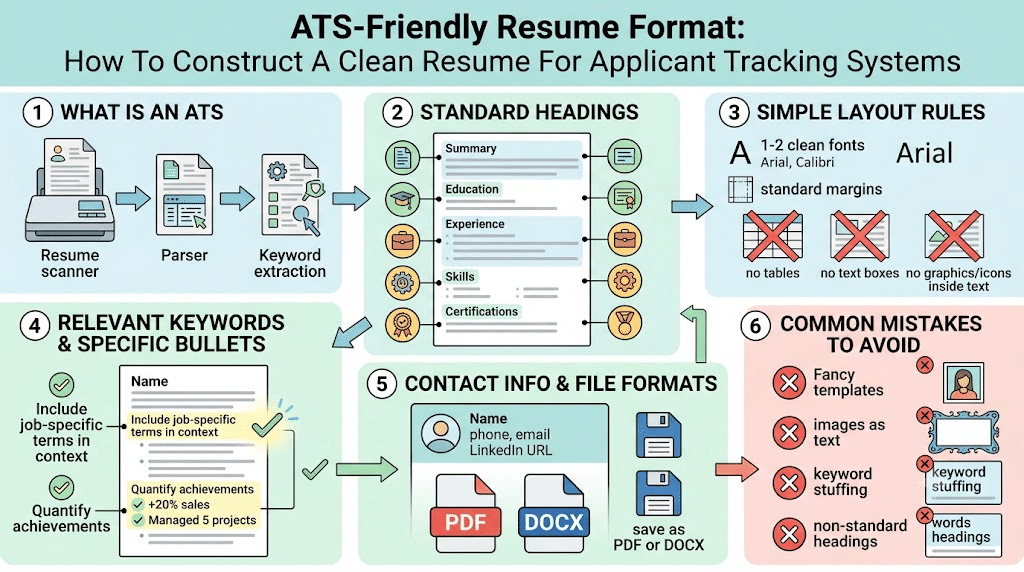
For example, ATS features such as resume scanning allow recruiters to find applicants with specific skills or experience. A recruiter looking for a marketing intern, for instance, can scan through resumes searching for keywords like ‘digital marketing’, ‘social media’, ‘content writing’, or ‘Google Analytics’. This, in turn, informs the importance of keyword inclusion in ATS-friendly resumes.
What Does An ATS-Friendly Resume Look Like?
ATS-friendly resumes tend to feature straightforward designs. They also make good use of standard section headings, file formats, and keywords.
ATS resumes typically feature the following sections, though their order may vary depending on the applicant’s status and years of experience: Name and contact information, Professional summary, Education, Work experience or internships, Skills, Projects, Certification when applicable, and Other relevant sections.
Fresh graduates, for example, may want to place greater emphasis on their education, internships, and projects.
Use Standard Section Headings
It is generally a good idea to use standard section headings.
Standard headings include Summary, Education, Experience, Internships, Projects, Skills, Certifications, and Achievements.
Although alternative headings may seem more creative, they can also confuse the resume parser. For instance, while ‘My Journey’ may be an interesting replacement for ‘Experience’, it is better to use the standard resume section headings in ATS resumes.
Choose A Simple Layout
A resume’s layout is perhaps the most important factor in its ATS-friendliness. At a minimum, candidates should avoid using fancy formatting that can confuse the ATS resume parser.
A simple ATS resume layout can include 1-2 fonts in standard sizes, clear section headings, normal bullets that are not too big or too small, ample spacing between sections, and standard margins.
Text boxes, tables, graphics, and other elements can also confuse an ATS resume scanner. They may also render the information unreadable or unscannable. That said, ATS software varies in its ability to read complex resume layouts. Therefore, while tables of experience or similar features may be acceptable in some contexts, they are best avoided in ATS resumes.
Use Relevant Keywords
Keywords are an important part of any ATS resume. After all, recruiters scanning through resumes may use keyword searches to find applicants who fit the job description. This is why ATS resume builders recommend using keywords relevant to the position in question.
The simplest way to find relevant keywords is to review the job description. In particular, candidates should look for skills and qualifications that the employer is seeking.
Candidates should also avoid keyword stuffing. While it is important to include relevant keywords, repeating the same words over and over again can make the resume look unprofessional.
Write Specific Experience Bullets
In ATS resumes, it is important to replace generic bullet points with specific ones. Instead of writing ‘Worked on social media’, a candidate can write ‘Created social media posts and supported promotional campaigns for a college society’.
Not only is this more specific, but it also serves to highlight the candidate’s skills and experience. Where applicable, candidates should quantify their achievements. For instance, the above bullet point can be changed to ‘Created 20 promotional posts for a student campaign and supported weekly social media content creation’.
Keep Contact Information Simple
A resume’s name field should feature the candidate’s name in a prominent location at the beginning of the document. The next set of information should include relevant contact details, such as a phone number, email address, LinkedIn profile, and portfolio. Location can also be included if the recruiter needs it.
Once again, ATS resumes should avoid using images or other design elements. This is because they can make it harder for the ATS resume scanner to parse the information. Candidates should keep their contact information simple and easy to read. This will make it easier for both the ATS software and the recruiter to review the resume.
Avoid Unnecessary Graphics
As mentioned above, graphics and other design elements can make ATS resumes harder to scan. They also take up space that could be used to include more information. With that said, there are certain ATS resume builders and ATS resume scanners that are more sophisticated and can handle images.
This is why it is important to follow the application guidelines. If a company asks candidates to apply with a resume, it is probably best to avoid using graphics. Candidates applying for design-related jobs, on the other hand, may want to include a portfolio to highlight their work rather than including images in the resume itself.
Choose The Right File Format
Most ATS resume builders will have specific instructions regarding the file format of the resume. If a job listing asks specifically for a .pdf file, for instance, it is best to avoid sending a .doc or .txt file. In general, however, it is safer to use either a .pdf or .doc format.
The former tends to be preferred over the latter, as it is less likely to be corrupted or rendered unreadable by the ATS software. A .pdf file created in a word processor will also be easier for the ATS resume scanner to read than a scanned image of a physical resume. Once again, it is best to follow the specific instructions provided by the employer or the ATS resume builder programme.
Keep The Resume Focused
ATS resumes should also be focused. This means that, rather than trying to include as much information as possible, the candidate should limit the resume to the most relevant experiences and skills. In particular, student applicants should tailor their ATS resumes to the advertised job.
A student applying for a marketing internship, for example, does not need to include information about a cooking class they took.
A resume summarising relevant skills, experience, and achievements, on the other hand, will be easier for both the ATS and the recruiter to read. For students, this can include projects, internships, certifications, society experience, and skills pertinent to the field they are applying for.
Common ATS Resume Mistakes
Among the most common ATS resume mistakes are the use of fancy ATS resume templates. Candidates should also avoid putting important information in images. In addition to that, it is best to avoid using non-standard section headings, including irrelevant keywords, writing long paragraphs, and using inconsistent formatting. Finally, submitting a scanned resume or the same resume for every application is also a mistake.
References
[1] Oracle, “What Is an Applicant Tracking System?” Oracle.
[2] Workday, “Applicant Tracking System,” Workday.
[3] U.S. Department of Labor, “Resume Guide,” CareerOneStop.
[4] Indeed Career Guide, “How To Make Your Resume ATS-Friendly,” Indeed.