
10 Smart Tips to Take an Active Role in Virtual Meetings
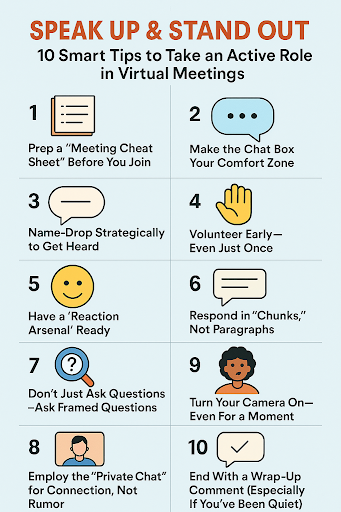
Introduction: From Silent Spectator to Confident Contributor
Virtual conferences aren’t disappearing—be it for college, internships, or remote work. But wake up: most aren’t engaged or sitting on mute the entire time. If you’re someone with thoughts but aren’t quite sure how to get in or fear speaking up too soon, then you’re not the only one.
Virtual meeting participation is a skill—and the best part? It’s fully learnable. The improved news? You don’t need to be the most vocal person in the room to be most remembered. You merely require clever entry points, timing, and micro-interactions that get you noticed without being embarrassing. Effective online collaboration also plays a key role, allowing you to contribute meaningfully to group discussions, projects, and brainstorming sessions even in a virtual setting. Let’s get started.
- Prep a “Meeting Cheat Sheet” Before You Join
Don’t wing it. Take a glance at the agenda (if you have one) and write down 2–3 mini takeaways, smart questions, or sources on the subject. Even if you cannot use them all, having ammunition in your back pocket makes you feel more empowered to chime up when the time is right. Tip bonus: Keep a virtual sticky note with your talking points open. That way, if you get ambushed, you will not freak out.
- Make the Chat Box Your Comfort Zone
Not quite ready to un-mice yet? Take over the conversation. Agree, ask a follow-up question, or throw in a bridging link. Comments such as “That’s an excellent point—particularly if we can bring it to bear on XYZ” get you heard. The added benefit? You receive attention without interrupting.
- Name-Drop Strategically to Get Heard
Need to add value but appear random? Begin with:
# “Following up on what [Name] just stated…”
or
#”I agree with [Name]—and in an attempt to throw another spin.”
It indicates you’re listening, justifies your contribution, and earns social credit both with the individual you’re quoting and with the group.
- Volunteer Early—Even Just Once
Psychologically, you are there in the beginning,10 minutes. Insert a word in edgewise in the meeting, even a brief reply or explanation. As soon as you establish a conversation, your brain understands that contribution is secure and, therefore, will be able to speak more freely later.
- Have a “Reaction Arsenal” ready
Use words such as sparingly—not as window dressing, but to demonstrate you’re listening. This is particularly effective in group situations or classes where silence translates as absence. The responses prompt the facilitator to listen and can gently push him to extend an invitation for your response soonafterwardss
- Respond in “Chunks,” Not Paragraphs
When you do respond, do not ramble. Structure your statement in this way:
Acknowledgement → Insight → Suggestion
# “I liked the information illustrated above. I think it begs the question of [insight]. Perhaps we could discuss [suggestion]?”
Short. Sharp. Powerful.
- Don’t Just Ask Questions—Ask Framed Questions
Rather than:
# “I don’t get this…”
Try:
# “I can see the theory behind the way this is supposed to work, but I’m having trouble getting a handle on how it works in [context]—can you elaborate on that?”
This is critical thinking, not disorientation. And yes, others do know the difference.
- Employ the “Private Chat” for Connection, Not Rumour
Have an idea that doesn’t seem safe to discuss openly? Share it with a colleague or host privately. They may answer it publicly, or better still, invite you to share more about it, which enables you to discuss without starting the conversation.
- Turn Your Camera On—Even For a Moment
We get it—camera fatigue is real. But even turning it on for 5–10 minutes at the start or when you’re speaking builds trust. People remember faces more than voice-only avatars. Bonus: it boosts your accountability to stay alert and present. especially during online collaboration, where visual cues strengthen connection and teamwork.
- End With a Wrap-Up Comment (Especially If You’ve Been Quiet)
If your day has been quieter, don’t go offline quietly. Take the last few minutes to say something such as:
# “Thanks for the chat—today’s lightbulb moment on [topic] helped me rethink [idea].”
It demonstrates gratitude and reflection—two underappreciated superpowers.
Conclusion
You don’t have to dominate the conversation to stand out in virtual meeting participation. Just show up prepared, engage intentionally, and look for small windows to add value. Over time, you’ll build visibility, confidence, and influence—without forcing it.
References
[1] D. Newman, “10 Smart Tips to Take an Active Role in Virtual Meetings,” LinkedIn, 2023. [Online]. Available:https://www.linkedin.com/pulse/10-smart-tips-take-active-role-virtual-meetings-david-newman
[2] M. Johnson, “Tips for Students and Professionals to Participate in Virtual Meetings,” EdTech Strategies, 2020. [Online]. Available: https://edtechmagazine.com/k12/article/2020/06/virtual-meeting-participation-tips
Penned by P.Sayee Dharshini
Edited by Shashank Khandelwal, Research Analyst
For any feedback mail us at [email protected]
Streamline Your Hiring with Eve Placement’s Custom Assessments
Eve Placement helps you engage, assess, and recruit top talent through tailored hiring challenges that go beyond resumes. From technical quizzes and real-world case studies to psychometric evaluations and audio/video submissions, our platform enables smarter, data-driven hiring decisions. Advanced security features ensure authenticity and eliminate fraud, giving you reliable results. Ready to hire better? Know More.
Mail us at [email protected]