
The Resume Trap: Why Fancy Templates Can Kill Your First Impression
7 Powerful Resume Tips
Where It All Started
I’m gonna tell you something straight. Resumes are not art projects – I learned this the hard way.
I was assisting my college mate, getting her to apply for internships. We spent hours on Canva, selecting what we believed was the ideal template. Crisp colours, tidy two-column designs, adorable little icons alongside skills. It was looking very slick.
But two weeks on? Nada. Responses.
It was not a problem with her experience or skills. Something was restraining her.
The Hidden Truth Most People Don’t Realize
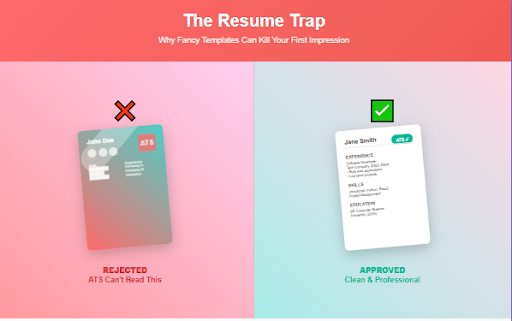
This is what most job applicants don’t know: Businesses use Applicant Tracking Systems (ATS) these days – an automated robot that scans resumes before a human recruiter lays eyes on them.
What drives these systems nuts?
- Excessive graphics → Automatic rejection
- Background colors → Filtered out
- Flashy fonts → Utter confusion
- Complicated layouts → Information gets lost
We’d inadvertently built a resume that was speaking a language no computer could comprehend.
What Recruiters Are Looking For
Through conversations with seniors and rooting around, I came across something straightforward: Recruiters don’t want to see your design skills.
They need to view quickly:
- Your true skills
- Schooling
- Experience
- Relevant certifications
That’s all. Keep it simple to discover, or get overlooked.
My Resume Screening Trick
Whenever I make a copy of my resume, I do this ninja trick: Copy it all into Notepad.
Does it look clean and readable? Good enough.
Looks like a mess? Time to re-design.
Rookie Blunders That Ruin Your Opportunities
Bingo list of resume design sins:
- Multi-column layout
- Random graphics
- Unreadable fonts
- Extraneous personal information
- Flourishes
The Watershed Moment
My friend stripped her resume bare. No colours. No fancy designs. Just plain Arial font.
The outcome? First interview call in days.
Same abilities. Different delivery.
One Easy Test I Always Suggest Before submitting your resume, do the following:
- Paste all text into a blank Notepad document
- Look and see if everything is clear and organised
- If not, tweak right away
What Works
Forget what you have been told regarding resume layout:
- Apply default fonts (Arial, Calibri)
- Keep to a single column
- No graphics
- 100% focus on content
- Not pretty, professional
The Hard Truth
Your resume isn’t a design contest. It’s a professional tool for communication.
No recruiter is spending time oohing and ahhing over your design. They need information, quick and clear.
Conclusion: Clarity is Your Real Superpower
Cease attempting to make your resume pretty. Make it professional.
Your skills will make more sense than your design.
Remember: A resume’s job isn’t to win design awards. It’s to open doors.
At the end of the day, clarity beats creativity. Every. Single. Time.
FAQs – Powerful Resume Tips
1. Why didn’t my stylish resume get any responses?
Modern resumes must be ATS-friendly. Excessive graphics, fancy fonts, or multi-column layouts can confuse applicant tracking systems, leading to automatic rejections.
2. What is an ATS, and why does it matter?
An ATS (Applicant Tracking System) is a tool used by companies to scan resumes. If your resume isn’t ATS-compatible, it might never reach a human recruiter. That’s why following clean and simple resume tips is crucial.
3. Are resume design templates from Canva bad?
Not always, but many Canva templates include visual elements that confuse ATS software. Stick to minimalist, single-column formats with standard fonts.
4. What fonts are best for a professional resume?
Use clean, standard fonts like Arial, Calibri, or Times New Roman. These are easily readable by both humans and ATS tools.
5. Should I use colors or icons on my resume?
Avoid them. ATS software can’t process icons, and background colors may cause text to disappear during parsing. One of the top resume tips: keep it black-and-white and text-based.
6. What’s the best layout for a resume?
A simple, single-column layout is best. Avoid tables, sidebars, or columns. Prioritize clarity and flow of information.
7. How can I test if my resume is ATS-friendly?
Copy all the content and paste it into Notepad. If it looks clean and organized, you’re on the right track. If it looks broken or messy, redesign it immediately.
8. What should a recruiter see within 5 seconds?
Recruiters want to instantly view your skills, education, work experience, and relevant certifications. Use bullet points, headings, and consistent formatting.
9. Are resume graphics ever acceptable?
Not in most cases. While they might look appealing, graphics confuse ATS software. One of the key resume tips is to avoid visuals and focus on content structure.
10. What common resume mistakes lead to rejection?
Common blunders include:
Multiple columns
Decorative fonts
Excess personal information
Charts or graphs
Background colors
Avoiding these mistakes is one of the most overlooked resume tips.
11. Should I include my photo on a resume?
Unless the job or country specifically requires it, skip the photo. It distracts from content and may cause ATS issues.
12. How do I make my resume stand out without design?
Use strong, action-oriented language. Focus on quantifiable achievements. Let your content, not your design, do the heavy lifting.
13. Is plain text really better than fancy layouts?
Absolutely. Simpler resumes pass through ATS filters more effectively. Basic formatting doesn’t mean boring—it means strategic.
14. What resume tips help boost interview calls?
Some effective resume tips include:
Use relevant keywords from the job description
Keep content concise
Tailor each resume to the specific job
Eliminate fluff and fillers
15. What’s the biggest myth about resume design?
That it needs to look artistic or “creative” to get attention. In reality, a resume is a communication tool, not a portfolio. Prioritize clarity over creativity.
16. Can too much personal information hurt my resume?
Yes. One of the key resume tips is to leave out unnecessary personal details like marital status, age, or hobbies unless they’re directly relevant. Keep the focus on qualifications and experience.
17. Do recruiters actually read resumes in detail?
Not initially. One of the most overlooked resume tips is that recruiters scan resumes in under 10 seconds. That’s why clarity, structure, and simplicity matter more than design flair.
18. How important are keywords in a resume?
Extremely. Smart resume tips recommend matching keywords from the job description to your resume so ATS systems can identify your profile as relevant.
19. What’s the ideal resume length?
The best resume tips suggest keeping it to one page if you’re a fresher or early-career professional. For more experienced roles, two pages max is acceptable—concise and targeted is key.
Penned by Vani Sahu
Edited by Shashank Khandelwal, Research Analyst
For any feedback mail us at [email protected]
Streamline Your Hiring with Eve Placement’s Custom Assessments
Eve Placement helps you engage, assess, and recruit top talent through tailored hiring challenges that go beyond resumes. From technical quizzes and real-world case studies to psychometric evaluations and audio/video submissions, our platform enables smarter, data-driven hiring decisions. Advanced security features ensure authenticity and eliminate fraud, giving you reliable results. Ready to hire better? Know More.
Mail us at [email protected]