
Video Interview Technology Tips to Make You Stand Out
Introduction
Alright, let’s break this down like a real person who’s probably had a few too many awkward Zoom calls in their lifetime.
First off—what the heck is a video interview?
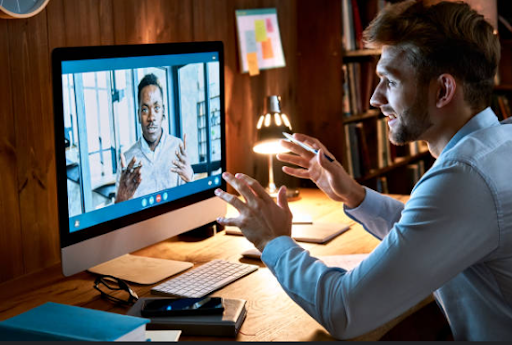
Basically, it’s a job interview, but you’re not in some stuffy boardroom, you’re at home (or wherever you can find decent Wi-Fi). Sometimes you’re chatting live with an actual human being, sometimes you’re just staring at your own face, recording answers to canned questions. Either way, the company’s grilling you to see what you know and if you’ll fit in with the team. Expect the usual mix: “Tell me about a time you…” “How would you handle…” “Do you actually know how to use Excel, or are you lying?” You get the idea.
How Hard Is the Interview?
Companies might hit you up for a video interview at literally any stage in the hiring process. Could be right at the start, could be the final boss battle. Sometimes it’s one round, sometimes it’s an endless parade of faces on your screen. Usually, though, plan for 30 minutes to an hour. Enough time to sweat a little, but not enough time to completely unravel.
Now, about the tech. Most companies will tell you what software they prefer. Zoom is the big one—everyone and their grandma uses it. But you could also get a Teams invite, or something like WebEx, Google Meet, or even Skype (if they’re stuck in 2013). If you don’t have whatever they want to use, you probably have to download it. But sometimes, you just get a link and boom, you’re in, no install needed. If you’re not sure, just ask the recruiter and save yourself a headache. Seriously, do a test run the day before. Nobody wants to be the “can you hear me?” person.
Alright, here’s the real stuff—tips so you don’t totally bomb:
Before the Interview:
- Pick a quiet, bright spot. Don’t do this in a cave– Natural light is magic, but a lamp or fancy ring light works too. If your roommate is blasting music, maybe bribe them to leave for an hour.
- Background check (not the legal kind)- Look behind you. Is it a laundry mountain? Move it. Ideally, you want something tidy, maybe a plant or a bookshelf, but nothing too wild. If you don’t want people judging your decor, slap on a virtual background.
- Frame your face, not your ceiling– Put your laptop so you’re not looking down at it (no one wants to see up your nose). Stack some books if you have to. Eye-level is the goal.
- Internet: don’t trust it blindly- Check your Wi-Fi. Seriously, test it. If you’re somewhere sketchy, maybe a hotspot from your phone. The last thing you want is to freeze mid-sentence.
- Dress like you mean business (at least up top)– Ask what the dress code is, or just go with something that makes you look sharp but not like you’re going to prom. Avoid wild patterns—cameras hate them. Do a quick check on camera to make sure you don’t look like a floating head.
- Sticky notes are your friend- One perk of video interviews—you can have cheat sheets! Jot down key points about the company, the job, and your killer anecdotes. Just don’t read off them like a robot.
- Mock interview- Yes, really. Get a friend to pretend to be the boss. Practice until you don’t sound like you’re reading a script. They’ll tell you if your lighting is wonky or if you keep looking at yourself instead of the camera.
- Day of the Interview: Now’s not the time for tech disasters. Double-check everything. Make sure your roommate’s not about to start vacuuming. You’re dressed, your background’s tidy, your notes are handy—now just breathe. You got this.
And hey, if all else fails and your cat walks across the keyboard, just roll with it. Real life happens.
Conclusion
Wrapping up, messing with your video interview setup isn’t just busywork—it’s you stacking the deck in your Favour. Seriously, picking decent interview software, making sure you don’t look like you’re broadcasting from a cave, checking your Wi-Fi doesn’t bail mid-sentence… all those little tweaks add up. Nail the basics and you’re not just ready—you’re actually ahead of the pack and ready to leave a mark. Go crush it.
20 FAQs about Virtual interviews
- What are the best video interview tips for beginners?
Start with the basics: test your tech, choose a quiet space, and dress professionally. Confidence grows with preparation. - How can I apply video interview tips to pre-recorded interviews?
Treat them like live interviews—plan your answers, maintain eye contact with the camera, and rehearse to avoid sounding robotic. - Do video interview tips differ for Zoom vs. Teams?
The core video interview tips stay the same, but familiarize yourself with each platform’s layout and mute/video controls. - What lighting setup works best according to video interview tips?
Natural light is ideal. If unavailable, use a ring light or desk lamp to evenly illuminate your face without harsh shadows. - Are there video interview tips for handling tech issues?
Yes—always do a test run, have a backup device or hotspot ready, and keep the recruiter’s contact info nearby. - What background is ideal based on video interview tips?
Choose a tidy, neutral background. A bookshelf or plant works well. Avoid clutter or distracting visuals. - Can video interview tips help reduce nervousness?
Definitely. Practicing answers, setting up early, and using calming techniques like deep breathing can ease anxiety. - What are the top video interview tips for remote jobs?
Highlight your remote work skills, show comfort with tech, and demonstrate self-motivation and communication abilities. - How do video interview tips improve first impressions?
They help you look polished, sound prepared, and come across as confident—all key to making a strong first impression. - Are sticky notes recommended in video interview tips?
Yes—use them for quick reminders or bullet points, but avoid reading directly from them to keep your delivery natural. - What dress code is suggested in video interview tips?
Dress professionally from head to toe. Solid colors work best, and avoid busy patterns that distract on camera. - Do video interview tips include body language advice?
Absolutely. Sit up straight, smile, and maintain eye contact with the camera—not your own video feed. - How early should I log in, according to video interview tips?
Log in 10–15 minutes early to check your setup and settle in. It shows punctuality and professionalism. - What are the most overlooked video interview tips?
Camera framing, internet stability, and practicing with the actual platform are often missed but crucial. - Can video interview tips help with behavioral questions?
Yes—use the STAR method (Situation, Task, Action, Result) to structure compelling, concise responses. - Are mock interviews part of effective video interview tips?
Definitely. They help you refine your delivery, spot tech issues, and get feedback on your setup and tone. - How do video interview tips apply to group interviews?
Speak clearly, wait your turn, and engage with all participants. Use names when responding to build rapport. - What video interview tips help with camera framing?
Position the camera at eye level, center your face, and avoid extreme angles. Your face should be well-lit and visible. - Are there video interview tips for poor internet connections?
Yes—use a wired connection if possible, close background apps, and have a mobile hotspot as backup. - How do video interview tips help you stand out from other candidates?
They ensure you present yourself professionally, communicate clearly, and show genuine interest—making you memorable.
References:
- indeed, Editorial Team. “Video Interview Tips: How to Prepare and Excel.” Indeed, 2024. https://www.indeed.com/career-advice/interviewing/video-interview-tips
- The Muse. “10 Tips for Acing Your Next Video Interview.” https://www.themuse.com/advice/video-interview-tips
- LinkedIn Learning. “Virtual Interview Tips and Best Practices.” LinkedIn, 2023.
- SHRM. “How to Prepare for a Virtual Interview.” Society for Human Resource Management, 2023
Penned by Shreyaansh Kumar
Edited by Ragi Gilani, Research Analyst
For any feedback mail us at [email protected]
Streamline Your Hiring with Eve Placement’s Custom Assessments
Eve Placement helps you engage, assess, and recruit top talent through tailored hiring challenges that go beyond resumes. From technical quizzes and real-world case studies to psychometric evaluations and audio/video submissions, our platform enables smarter, data-driven hiring decisions. Advanced security features ensure authenticity and eliminate fraud, giving you reliable results. Ready to hire better? Know More.
Mail us at [email protected]