
Full-Stack Tech Interview Questions on Version Control (Git)
Published: Oct 15, 2026
Key Points
- Prepare for git interview questions: Understand essential Git concepts, commands, branching, merging, and version control before your technical interview.
- Learn Git vs. GitHub: Git tracks changes in your code, while GitHub hosts repositories online and supports team collaboration.
- Practice everyday Git commands: Know how to use git status, git add, git commit, git fetch, git pull, git restore, and git revert.
- Understand branching and merging: Learn how to create branches, merge changes, resolve merge conflicts, and collaborate without disrupting the main branch.
- Know merge vs. rebase: Understand how these operations combine changes and why rebasing shared commits can cause problems.
- Master pull request workflows: Practice reviewing code, discussing changes, resolving feedback, and merging approved pull requests.
- Explore advanced Git features: Learn when to use git stash, git cherry-pick, and git bisect to handle common development challenges.
- Follow Git best practices: Write clear commit messages, use a .gitignore file, avoid committing secrets, and review changes before pushing them.
- Practice real-world scenarios: Prepare to explain how you would resolve conflicts, undo mistakes, recover changes, and work with a development team.
1. Why Interviewers Ask About Git
Code is a team sport
Git interview questions help freshers and experienced developers demonstrate their knowledge of version control, Git commands, branching, merging, and team collaboration. Preparing these questions with practical examples can help you understand common development workflows and answer technical interview questions confidently. This guide covers essential Git concepts, everyday commands, and real-world scenarios to help you prepare for full-stack developer interviews.
Almost every full-stack interview touches Git at some point, even when the role is mostly React or Node. The reason is simple. Version control shows how you work with other people. A candidate who can explain branches and pull requests clearly usually collaborates well too. Here are the questions that come up most often, with short answers you could say out loud.
2. Basic Concepts
Start with the fundamentals
What is version control? It is a system that records changes to files over time, so you can go back to an older version, compare changes and see who changed what.
What is the difference between Git and GitHub? Git is the tool that tracks your changes. GitHub is a website that hosts Git repositories and adds things like pull requests and issues. Git is also distributed, which means every developer holds a full copy of the project history.
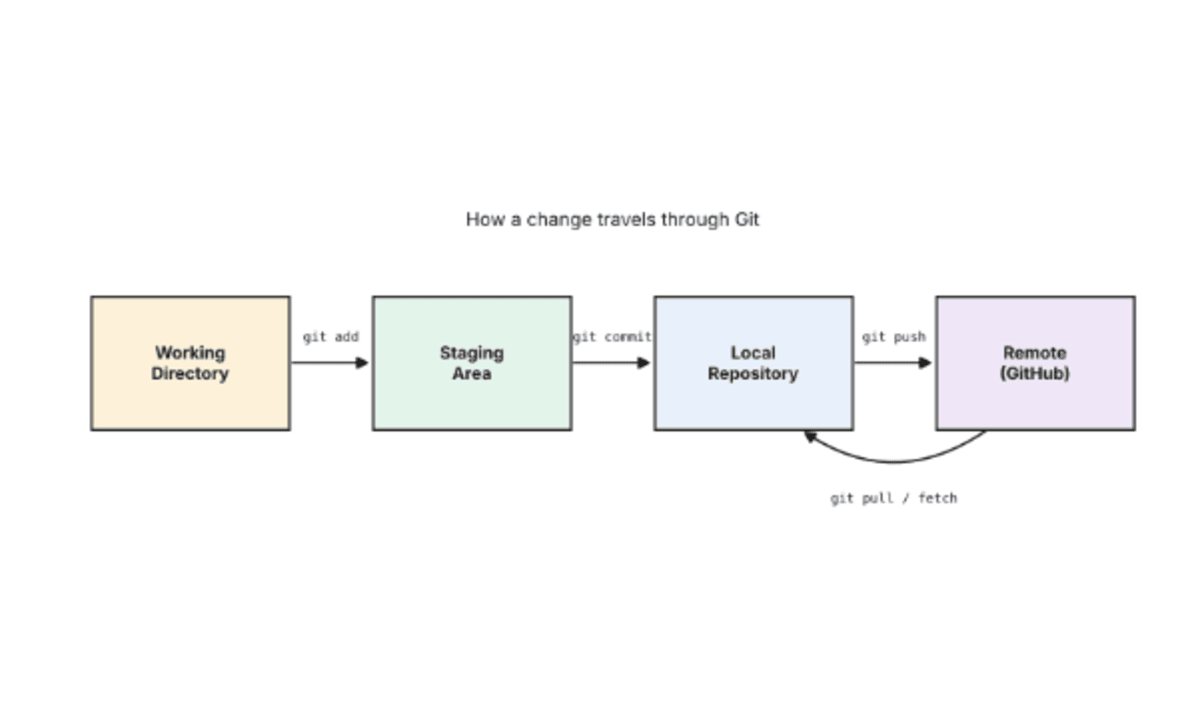
What are the working directory, staging area and repository? The working directory is where you edit files. The staging area holds the changes you plan to commit next. The repository stores the committed history.
3. Everyday Commands
The commands you type ten times a day
What is the difference between git fetch and git pull? Fetch downloads new commits but leaves your files alone. Pull does a fetch and then merges the result into your current branch.
What does git status show? It shows which files have changed, which ones are staged and which branch you are on. Run it often, because it saves you from nasty surprises before a commit.
How do you undo a mistake? It depends on where the mistake is. git restore throws away unstaged edits. git reset moves a branch back to an earlier commit. git revert creates a new commit that cancels an old one, which makes it the safe choice on shared branches.
4. Branching and Merging
Work on ideas without breaking main
A branch in Git is just a lightweight pointer to a commit, so making one costs almost nothing. Most teams create a branch for each feature or bug fix, commit there, and merge it back when the work is ready.

What is a merge conflict and how do you fix it? A conflict happens when two branches change the same lines and Git cannot decide which version wins. Open the file, look for the conflict markers, keep the correct code, remove the markers, then add and commit the file.
5. Merge vs Rebase
The classic debate
Merge joins two histories with a merge commit, so the past stays exactly as it happened. Rebase replays your commits on top of another branch, which gives a clean straight line. The rule interviewers love to hear is this: never rebase commits that other people have already pulled, because rebasing rewrites history and creates a mess for your teammates.

6. Pull Requests and Team Workflow
Where collaboration really happens
A pull request lets you tell teammates about changes you have pushed to a branch, so they can review them, discuss them and suggest fixes before anything is merged. Good pull requests are small, have a clear title and explain why the change exists.

How do you keep a fork up to date? Add the original repository as a remote called upstream, fetch from it, and merge or rebase its main branch into yours.
What is a .gitignore file? It lists files Git should not track, such as node_modules, build folders and .env files that hold secrets.
7. Tricky Questions
The ones that separate good from great
What does git stash do? It saves unfinished work temporarily so you can switch branches with a clean working directory.
What is cherry-pick? It copies one specific commit onto your current branch. It is handy when a bug fix landed on the wrong branch and you only need that one change.
What is git bisect? It runs a binary search through your history to find the commit that introduced a bug.
You pushed a password by mistake. What now? Change the password immediately, then remove it from history. Deleting it in a new commit is not enough, because the old commit still contains it.
8. Tips for Interview Day
Say it simply and show you have done it
Explain answers with a real example from your own project, because that sounds far more convincing than a memorised definition. Practise in a throwaway repository until the commands feel natural. If you are not sure about something, say so honestly and explain how you would find out. For more practice, the Pro Git book is free to read, and DataCamp has a long list of sample questions.
References
[1] S. Chacon and B. Straub, “Pro Git, 2nd Edition,” Git. [Online]. Available: https://git-scm.com/book/en/v
[2] GitHub, “About pull requests,” GitHub Docs. [Online]. Available: https://docs.github.com/en/pull-requests/collaborating-with-pull-requests/proposing-changes-to-your-work-with-pull-requests/about-pull-requests
[3] Atlassian, “Merging vs. Rebasing,” Atlassian Git Tutorial. [Online]. Available: https://www.atlassian.com/git/tutorials/merging-vs-rebasing
[4] DataCamp, “Git Interview Questions and Answers,” DataCamp. [Online]. Available: https://www.datacamp.com/blog/git-interview-questions-and-answers
Frequently Asked Questions
1. What are the most common Git interview questions?
Common Git interview questions cover version control, Git vs. GitHub, basic commands, branching, merging, merge conflicts, rebasing, and pull requests.
2. What is Git, and why is it used?
Git is a distributed version control system that tracks changes in source code. Developers use it to manage project history, collaborate with teammates, and restore earlier versions when necessary.
3. What is the difference between Git and GitHub?
Git is a version control system that runs locally or on a server. GitHub is an online platform that hosts Git repositories and provides collaboration features such as pull requests, code reviews, and issue tracking.
4. What are the basic Git commands every developer should know?
Important Git commands include git init, git clone, git status, git add, git commit, git push, git pull, git fetch, and git log.
5. What is the difference between git fetch and git pull?
git fetch downloads updates from a remote repository without integrating them into the current branch. git pull fetches updates and then integrates them, typically through a merge or rebase depending on the configuration.
6. What is a Git branch?
A Git branch is an independent line of development. Developers create branches to build features, fix bugs, or test changes without directly modifying the main development branch.
7. What is the difference between git merge and git rebase?
git merge combines changes from different branches and may create a merge commit. git rebase replays commits onto another base commit, creating a more linear history but changing commit identities.
8. How do you resolve a merge conflict in Git?
Identify the conflicting files using git status, open them, resolve the conflict markers, save the changes, and stage the corrected files. Complete the merge with a commit if required, or continue the rebase if you were rebasing.
9. What is the difference between git reset and git revert?
git reset moves the current branch reference and can change the staging area or working directory, depending on the option used. git revert creates a new commit that reverses the changes introduced by an earlier commit.
10. What is a pull request in Git?
A pull request is a collaboration feature on platforms such as GitHub. It allows developers to propose changes, request code reviews, discuss feedback, and merge approved changes into another branch.
11. What is the purpose of the .gitignore file?
The .gitignore file specifies files and directories Git should ignore when detecting untracked files. It is commonly used for build outputs, temporary files, local configuration, and dependency folders.
12. What is the difference between git add and git commit?
git add stages selected changes for the next commit. git commit records the staged changes as a snapshot in the repository’s history.
13. What does git stash do?
git stash temporarily saves changes in the working directory so you can work on something else without creating a commit. You can later reapply the saved changes using commands such as git stash apply or git stash pop.
14. How can you undo a commit in Git?
The appropriate command depends on your situation. You can use git revert to reverse a commit safely in shared history, or git reset to move a branch pointer when rewriting local history is appropriate. Avoid rewriting shared history without coordinating with your team.
15. How should freshers prepare for Git interview questions?
Freshers should learn essential Git concepts, practice common commands in a sample repository, understand branching and merging, resolve merge conflicts, and rehearse real-world scenarios. Explaining each command with a practical example can also improve interview performance.
Citations & References
[1] S. Chacon and B. Straub, “Pro Git, 2nd Edition,” Git. [Online]. Available: https://git-scm.com/book/en/v
[2] GitHub, “About pull requests,” GitHub Docs. [Online]. Available: https://docs.github.com/en/pull-requests/collaborating-with-pull-requests/proposing-changes-to-your-work-with-pull-requests/about-pull-requests
[3] Atlassian, “Merging vs. Rebasing,” Atlassian Git Tutorial. [Online]. Available: https://www.atlassian.com/git/tutorials/merging-vs-rebasing
[4] DataCamp, “Git Interview Questions and Answers,” DataCamp. [Online]. Available: https://www.datacamp.com/blog/git-interview-questions-and-answers
Streamline Your Hiring with Eve Placement
Engage, assess, and recruit top talent through tailored AI hiring challenges that go beyond resumes. Ready to hire better? Contact our research team for a custom consultation.